Hanging Banner Poster Mockup: Showcase Designs with Impact
When you need to present a poster or banner design to a client, the context in which it's shown can make all the difference. Simply displaying a flat, digital file often lacks the real-world impact needed to convey the design's true potential. This is where a high-quality mockup becomes an indispensable asset. A Hanging Banner Poster Mockup offers a dynamic and professional way to visualize your work, transforming a digital concept into a tangible, relatable scene. It’s a tool that bridges the gap between your creative vision and a client's understanding, allowing them to see not just the design, but its application in a realistic environment.
The Practical Power of a Realistic Presentation
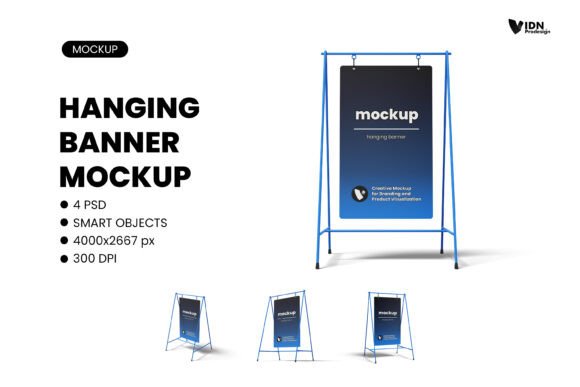
The core appeal of this particular mockup lies in its ability to save time while elevating your presentation quality. The file is a fully layered PSD, built with a resolution of 300 dpi and a generous dimension of 4000x2667 px. This high resolution ensures that your design details remain crisp and clear, whether viewed on a high-resolution monitor or printed for a physical presentation. The smart object feature is the real workhorse here. By simply double-clicking the designated smart layer in Photoshop, you can paste your artwork, save, and watch it seamlessly wrap into the mockup's perspective, complete with natural lighting and shadows. This process eliminates the tedious manual warping and adjustment that often eats into productive hours.
For a designer juggling multiple projects, this efficiency is critical. Imagine you're working on a brand identity package that includes promotional banners. Instead of sending a simple PDF, you can generate a mockup showing the banner hanging in a gallery-like space or against a textured wall. This helps the client visualize the final product in a way that sparks immediate feedback and approval. The changeable color object and background feature adds another layer of customization, allowing you to match the mockup's environment to your client's brand palette or the desired mood of the presentation. It’s a small detail that significantly enhances the perceived professionalism of your deliverables.
Applications Across Creative and Commercial Projects
The utility of a Hanging Banner Poster Mockup extends far beyond standard graphic design. For marketers and content creators, it’s a powerful tool for pitching campaign visuals. A social media manager can showcase an upcoming promotional banner in a mockup to demonstrate how it will look in a real-world retail or event setting, making the abstract concept of a "digital campaign" much more concrete for stakeholders. Entrepreneurs and small business owners preparing for trade shows, pop-up shops, or in-store promotions can use it to visualize signage and point-of-sale materials, helping them make more informed decisions about print sizes and placement.
In the realm of publishing and editorial design, the mockup can be used to present book covers, event posters, or magazine features in a compelling way. A blogger or hobbyist selling prints or artwork can create professional-looking shop images or portfolio pieces without needing a physical photo shoot. The mockup acts as a versatile stage, adaptable to countless scenarios. Its clean, uncluttered style ensures the focus remains squarely on your design, making it suitable for minimalist, modern, or even vintage-inspired projects depending on the background color you choose.
Integrating Mockups into Your Design Workflow
Adopting a mockup like this into your process is straightforward, but a few practical considerations can maximize its value. First, always use the help file included if you're unfamiliar with smart objects. It provides clear guidance that can prevent common pitfalls. Second, while the mockup provides a realistic setting, ensure your design itself is polished. A poorly executed design will still look unprofessional, even in the most stunning mockup. Use the mockup to complement your work, not to compensate for it.
Consider the psychological impact of your presentation. Showing a design in a physical context—hanging on a wall, for instance—subconsciously communicates stability, permanence, and value. It tells the client, "This is a finished product, ready for the world." This can be particularly effective when presenting packaging design concepts or logo design applications. Seeing a logo on a hanging banner gives it a different weight than seeing it on a business card mockup. It speaks to scale, visibility, and presence.
Finally, remember that this is a design asset. Like any tool, its effectiveness depends on how you use it. Don't rely on a single mockup for every project. Have a variety of mockups in your library—some for digital displays, some for print, some for physical products—to ensure each presentation is contextually appropriate. The Hanging Banner Poster Mockup is perfect for projects where visibility, scale, and a touch of elegance are key. Its high resolution and easy customization make it a reliable workhorse for designers who value both quality and efficiency in their client communications.