Add a Veil of Mystery with Smoke Bomb Photo Overlays
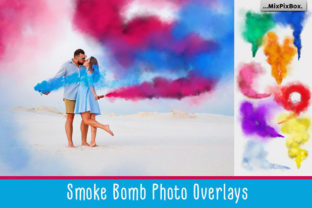
There’s a certain kind of magic that happens when you introduce smoke into a scene. It softens edges, adds depth, and creates an atmosphere that’s impossible to ignore. It’s the difference between a straightforward portrait and a moody, cinematic moment. But capturing real smoke on cue is messy, unpredictable, and often impractical. That’s where a high-quality asset like this collection of Smoke Bomb Photo Overlays becomes an indispensable part of your creative toolkit. We’re not just talking about a few generic fog effects; this is a curated set of 30 vibrant, swirling swaths of color and texture, designed to give your work an immediate, professional edge.
What Exactly Are You Getting?
Imagine having the visual essence of a colorful smoke bomb explosion, frozen in time and ready to be layered onto any project. This package delivers exactly that. Each of the 30 elements is a high-resolution PNG file (300 DPI) with a transparent background. This format is crucial because it means you’re not just getting a colored cloud on a white or black square—you’re getting the pure, organic form of the smoke itself. The transparent background allows the smoke to blend seamlessly over your photographs, illustrations, or designs, as if it were actually there. The collection includes a fantastic variety: dense, billowing plumes, delicate wisps, and chaotic, swirling vortexes of color. You’ll find everything from deep, moody tones to bright, energetic hues, ensuring you have the right texture for any mood.
Practical Applications for Creators and Brands
The true value of any design asset lies in its versatility. This smoke bomb overlay set is a powerhouse for a wide range of projects. Let’s break down where it truly shines:
- Portrait and Fashion Photography: This is the most direct application. Add a burst of colored smoke behind a subject for a dramatic, editorial look. Use a subtle, smoky veil to soften a harsh background or create a sense of mystery and movement in an otherwise static pose. It’s perfect for senior portraits, band photos, or avant-garde fashion editorials.
- Social Media Graphics and Branding: In a crowded digital space, standing out is everything. A well-placed smoke effect can make a product shot for a perfume, a tech gadget, or even a beverage feel more luxurious and dynamic. For social media graphics, these overlays can create eye-catching Instagram stories, Facebook ads, or YouTube thumbnails that stop the scroll. They contribute significantly to a modern, edgy brand identity.
- Digital Art and Illustration: Digital painters and illustrators can use these overlays to add texture and atmosphere to their work. Create ethereal backgrounds for character art, add a mystical glow to a fantasy scene, or use the swirling patterns as a unique element in abstract compositions.
- Web and Editorial Design: In web design, a faint smoke texture can serve as a sophisticated background for a hero section. In editorial design for magazines or blogs, these overlays can be used to create captivating feature images that draw readers into the story.
- Event and Product Packaging: Designers working on posters for music festivals, theater productions, or product launches can use these effects to create a sense of energy and excitement. The same principle applies to packaging design where a touch of smoke can add a premium, artisanal feel.
How Smoke Effects Influence Perception and Engagement
Using an overlay is more than just a decorative choice; it’s a strategic one that influences how your audience perceives your work. The visual language of smoke is powerful. It can convey transformation, mystery, celebration, or calm, depending on its color and density.
By adding a smoke bomb photo overlay, you’re directly impacting the visual hierarchy of your piece. The eye is naturally drawn to areas of contrast and complexity. A burst of smoke can frame your main subject, guide the viewer’s eye across the page, or create a focal point that demands attention. This isn’t just about making something look "cool"; it’s about using visual tools to communicate more effectively and enhance audience engagement.
For a brand, consistency is key. If your brand personality is bold, energetic, and modern, incorporating these vibrant smoke textures into your visuals can reinforce that perception across all touchpoints—from your website to your social media graphics. It helps build a recognizable and cohesive brand identity that feels professional and intentional.
A Designer’s Guide to Using These Overlays Effectively
Having the asset is one thing; using it well is another. Here’s some practical advice for integrating these smoke overlays into your workflow:
- Layer Blending is Your Best Friend: Don’t just place the smoke on top of your image. Experiment with layer blending modes in Photoshop, GIMP, or your preferred software. Modes like Screen and Lighten are fantastic for making the smoke appear to glow and interact with the light in your scene. Multiply and Overlay can create different, more integrated effects.
- Transform and Distort: Use the Free Transform tool (Ctrl/Cmd+T) to scale, rotate, and skew the overlay to fit your composition perfectly. Don’t be afraid to distort it using Warp or Puppet Warp to make it wrap around your subject organically.
- Color Adjustment: While the overlays come in a variety of colors, you can easily adjust them further. Use Hue/Saturation or Color Balance adjustment layers clipped to the smoke layer to tweak the color to match your exact brand palette or desired mood.
- Less is Often More: A subtle touch of smoke can be more effective than a dense, opaque cloud. Use a soft eraser at low opacity or a layer mask to gently fade the smoke, revealing the details of your underlying image. This creates a more natural, integrated look.
- Combine and Experiment: Don’t limit yourself to using just one overlay. Layer multiple smoke elements together, changing their size, color, and opacity to create complex, unique atmospheric effects that are entirely your own.
This collection of Smoke Bomb Photo Overlays is a versatile design asset that empowers you to create professional, atmospheric work with ease. It’s about giving yourself the tools to quickly execute a creative vision, whether you’re a photographer, a social media manager, a graphic designer, or a hobbyist looking to add a new dimension to your personal projects. The real magic happens when you start experimenting and see how these vibrant textures can transform your work from ordinary to unforgettable.